


CookBooker: AI Cook Book
4.618.00 Reviews
App Specs
- Version
- 1.1.20
- Updated On
- License
- Free
- Downloads
- 10,000+
- Developer
- MesMoustaches.Dev
- Categories
- Food & Drink
- Platform
- Android
Screenshots



 Analysis by AppCompare
I see CookBooker as a useful idea with a clear everyday purpose: help turn the food already in your kitchen into something you can actually make, then give you a place to keep recipes you want to cook again. That combination makes it more appealing to me than a recipe feed that only inspires you to buy ingredients. Its promise is practical, though the experience is strongest when you treat suggestions as a starting point and stay ready to adapt them to your pantry, tastes, and time.
A helpful bridge between inspiration and dinner
Recipe apps often lean toward one of two routines: browse attractive dishes until something catches your eye, or search for a particular meal you have already decided to make. CookBooker is more interesting when I use it in the opposite direction: begin with what is on hand, then see what might come of it. That shift can make a weeknight decision less tiring, especially when the fridge holds odds and ends rather than a complete plan.
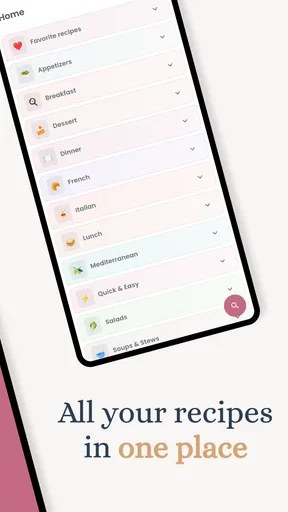
The personal cookbook angle matters just as much. A recipe that works once is easy to lose in a browser tab, a screenshot, or a message thread. Keeping useful finds together gives me a more deliberate way to build a collection around meals I would genuinely cook again, rather than accumulating ideas I never revisit. The app is free to download, with optional in-app purchases ranging from $0.99 to $18.99 per item, so I would check what is included before buying anything and decide whether the paid options match how often I cook.
Where it fits in a real cooking routine
Imagine getting home late with a few vegetables that need using, some chicken, and no appetite for a supermarket detour. I would enter the ingredients, scan the suggested recipes, and choose one that fits the time and energy I have that evening. The useful part is not expecting the app to produce a perfect answer from every combination; it is getting a few plausible directions when I might otherwise repeat the same meal or order food.
For better results, I would be specific about ingredients that need using soon and keep the list honest. If I enter a condiment or staple I do not actually have, a suggestion can look more convenient than it is. I would also think of quantities and substitutions as decisions to verify while cooking, rather than assuming that an ingredient match automatically accounts for what is in my cupboard. This small habit keeps the recipe search grounded in the kitchen I actually have.
There is a trade-off between asking an app to choose for me and relying on my own judgement. Ingredient-based suggestions can reduce the mental work of starting dinner, but they do not replace checking whether a dish suits everyone eating it, whether the cooking steps fit the evening, or whether a proposed substitute will work. I find the best role for CookBooker is as a brainstorming partner: it narrows the field, while I make the final call.
Who is likely to get the most from it
I would recommend trying it if you cook at home often enough to build a personal recipe collection, but do not always know what to make next. It may be especially useful for someone learning to cook who wants direction at the point of choosing a meal, or for a household trying to make better use of ingredients before they go to waste. The Food & Drink app is made by MesMoustaches.Dev, has an Everyone age rating, and has passed the 10K-install mark, which suggests it has found an audience without making it a household default.
Worth Reading Before You Choose

Flipboard Shows What News Apps Must Do Beyond the Feed

Switching to Android Auto Means Rethinking Your Driving Routine

Google Calendar Makes a Crowded Week Easier to Manage

Ludo King Makes the Most of the Minutes Between Plans

Baby Panda World Brings Quick Play to Modern Phones, but Its Game Library Feels Busy

ESPN’s Live Game View Makes Following Close Games Easier
It is a less natural fit if you already have a strict meal-planning system, keep recipes in a format you are happy with, or want a specialist source for a particular cuisine. Someone who primarily needs precise nutrition tracking, carefully verified dietary guidance, or a tightly managed shopping workflow should choose a tool built specifically around that job. For allergy-sensitive cooking, I would treat personal preference settings as helpful context, not as a substitute for reading every ingredient and checking labels myself.
How it compares with familiar alternatives
Compared with searching the web for “what can I cook with these ingredients,” a dedicated recipe organizer can make the process feel more focused and give successful dishes a home for later. A plain notes app can also store recipes, but it leaves the work of finding ideas and organizing them largely to you. On the other hand, a large recipe website may be a better choice when you want broad editorial coverage, detailed cuisine browsing, or many independent versions of a particular dish. CookBooker’s appeal is the more personal loop between finding an idea and keeping it for your own cooking.
I would not judge it by whether it replaces every cooking resource. Instead, I would ask whether its ingredient-led approach and cookbook organization remove friction from the meals I actually make. If I mostly follow family recipes or cook from a fixed rotation, a folder or notes app might be quicker. If I regularly face an uncertain fridge and want to save promising discoveries, a dedicated app has a clearer advantage.
Getting Started with CookBooker
Installing CookBooker: AI Cook Book was a breeze. Available for both Android and iOS, I found it on the app store, hit download, and within minutes, I was ready to explore. The interface is sleek and user-friendly, with a clean design that makes navigation a piece of cake (pun intended!).
The onboarding process is quite engaging. You begin by setting your preferences—dietary restrictions, favorite cuisines, and any allergies. This ensures that the recipes you receive are tailored to your specific needs. I appreciated this feature, as it felt like the app was genuinely trying to get to know me, rather than bombarding me with irrelevant options.
Features that Stand Out
What sets CookBooker apart from the myriad of cooking apps out there? Here’s a peek at some of its standout features:
- Ingredient-Based Suggestions: Simply input the ingredients you have, and CookBooker will whip up a list of potential recipes. No more last-minute grocery store runs!
- AI-Powered Recommendations: The app learns from your cooking habits and preferences, offering increasingly personalized suggestions over time. It’s like having your own culinary assistant.
- Step-by-Step Cooking Guides: Each recipe comes with detailed instructions and even video tutorials. Perfect for those of us who need a little extra guidance in the kitchen.
- Meal Planning: You can plan your meals for the week, ensuring you’re always prepared and minimizing food waste.
- Community Sharing: Connect with other users, share your culinary creations, and get inspired by what others are cooking.
Cooking Up a Storm
One evening, armed with just some chicken, a couple of veggies, and a pantry full of spices, I decided to put CookBooker to the test. I input the ingredients, and voila! The app suggested a delightful chicken stir-fry recipe. The instructions were straightforward, and even included a video guide, which was super helpful.
The dish turned out to be a hit with my family. The app’s ability to transform a seemingly random assortment of ingredients into a delicious meal was nothing short of impressive. It’s moments like these that make CookBooker an indispensable kitchen companion.
Making the recipe collection work harder
The most useful cookbook is not necessarily the biggest one; it is the one that helps me make a decision when I am hungry and short on time. I would save recipes after trying them, then use a simple mental distinction when browsing later: dependable weeknight meals, dishes worth making when I have more time, and recipes I still want to test. That keeps a personal collection from turning into another endless feed.
Another practical habit is to record what I changed while the result is fresh in my mind. If I used a different vegetable, toned down a spice, or found that a step took longer than expected, that note can make the next attempt smoother. This is a general way to get more value from a digital cookbook, rather than relying on memory. It also helps me judge whether a recipe is genuinely worth keeping, instead of saving every appealing suggestion automatically.
Meal planning can be most helpful when I use it flexibly. I would plan around ingredients that overlap across a few meals, then leave room for a change of mind or a night when leftovers are the sensible choice. A plan that assumes every day will go perfectly can become a chore; a short list of options is easier to follow. For a small household, this approach can help use ingredients thoughtfully without requiring a rigid schedule.
Room for Improvement?
While CookBooker is undeniably a fantastic app, there are a couple of areas where I feel it could improve. For one, the app occasionally took a bit longer to load during peak times. Also, while the recipe variety is vast, I'd love to see more international dishes added to the mix.
However, these are minor hiccups in an otherwise stellar experience. The developers seem committed to updates, so I’m optimistic these issues will be ironed out in future versions.
What to consider before relying on it
Recipe discovery is only as convenient as the information I can enter and the suggestions I am willing to adapt. If I am looking for an exact dish, browsing or searching a specialist recipe source may be faster than starting with a list of ingredients. If I am trying to cook around several restrictions, I would double-check each recipe carefully rather than assuming that a preference setting catches every concern. That is particularly important when someone else is eating the meal and has a serious allergy.
I would also keep expectations realistic about personalization. Recommendations can become more relevant as I use an app, but that does not mean every suggestion will match my taste or the ingredients I want to use. When a result is close but not quite right, changing the search inputs or choosing a simpler recipe may be more productive than trying to force the first idea to work. That little bit of user judgement is part of cooking, not a failure of the app.
CookBooker is currently at version 1.1.20 and supports devices running Android 7.0 or later. The average rating is 4.6 from around 220 ratings, with 18 written reviews. I see those figures as useful context, not a guarantee that every person will have the same experience: the right test is whether its recipe suggestions and saved collection suit your own cooking habits.
Final Thoughts
In a world where convenience is king, CookBooker: AI Cook Book is a game-changer for home cooks and food enthusiasts alike. Its ability to provide personalized, ingredient-based recipes is a boon for anyone looking to simplify their cooking routine and minimize food waste.
Whether you’re a seasoned chef or a kitchen novice, CookBooker caters to all skill levels, making it an essential tool in the culinary arsenal. So, if you’re tired of the same old meals or just want to get more creative in the kitchen, give CookBooker a try. You might just find yourself cooking up a storm with newfound confidence.
My verdict is positive, with a practical caveat: this is most convincing as a recipe-finding and saving companion, not as an authority that can make every kitchen decision for you. If you like experimenting with ingredients, want one place for recipes you plan to revisit, and are comfortable checking details as you cook, I think it is worth a look. If you need a highly specialized nutrition tool, a rigorously curated cuisine library, or a no-input solution that plans every meal automatically, another option will serve you better.
Pros
- Intuitive interface for easy navigation.
- AI suggestions enhance recipe discovery.
- Customizable recipe collections.
- Supports diverse dietary preferences.
- Offline access to saved recipes.
Cons
- Requires internet for AI features.
- Limited free version features.
- Occasional app crashes reported.
- In-app ads in the free version.
- Recipes lack user ratings.
FAQs for CookBooker: AI Cook Book
What is CookBooker: AI Cook Book and how does it work?
CookBooker: AI Cook Book is an innovative app designed to enhance your cooking experience by providing personalized recipes and cooking tips. Utilizing advanced AI technology, the app learns your preferences and dietary restrictions, offering tailored suggestions. It features a vast library of recipes and interactive cooking guides to make your culinary journey easier and more enjoyable.
Is CookBooker: AI Cook Book suitable for people with dietary restrictions?
Yes, CookBooker is designed to accommodate various dietary needs. Users can input specific restrictions such as gluten-free, vegan, or nut allergies, and the app will filter recipes accordingly. This ensures that you have access to a wide range of delicious meals that fit your lifestyle and health requirements.
Does CookBooker require an internet connection to access recipes?
CookBooker: AI Cook Book primarily requires an internet connection to access its full library of recipes and utilize AI-powered features. However, you can download recipes for offline use, ensuring that you have access to your favorite dishes even without internet connectivity. This feature is particularly useful for cooking in areas with limited access.
How does CookBooker help improve my cooking skills?
CookBooker offers interactive cooking guides and step-by-step instructions to help users enhance their culinary skills. The app provides video tutorials, expert tips, and cooking techniques to assist both beginners and experienced chefs. Additionally, the AI analyzes your cooking habits and suggests ways to refine your skills over time.
Is there a cost associated with using CookBooker: AI Cook Book?
CookBooker offers a free version with basic features, but for advanced functionalities such as personalized recipe suggestions and exclusive content, users may opt for a premium subscription. This subscription model provides a more tailored and ad-free experience, unlocking the full potential of the app’s AI capabilities.


